
PNBUtilities
PanoBox
Copy. Find. Paste. Clipboard history that stays on your PC.
Downloads and documentation are published on GitHub; the source code is not. GitHub
01Overview
PanoBox keeps a searchable history of copied text, images and file paths on your Windows PC. Open its keyboard palette, search for an earlier entry, and reuse it without looking through documents or copying the same thing again. The interface is available in English and Turkish, and PanoBox can be installed for your Windows account or run as a portable app.
Pinned entries and reusable templates keep everyday text close at hand. Local Windows OCR extracts text from stored images when a suitable language package is installed, while local QR generation turns a text entry into an image you can scan with another device.
Clipboard data is private by nature. PanoBox stores its working data locally without application-level encryption, so use its pause, exclusion and deletion controls when needed; backups can be encrypted with a password. Clipboard history continues to work without internet access; checking for a newer version is a separate action you choose.
02Capabilities
A keyboard clipboard
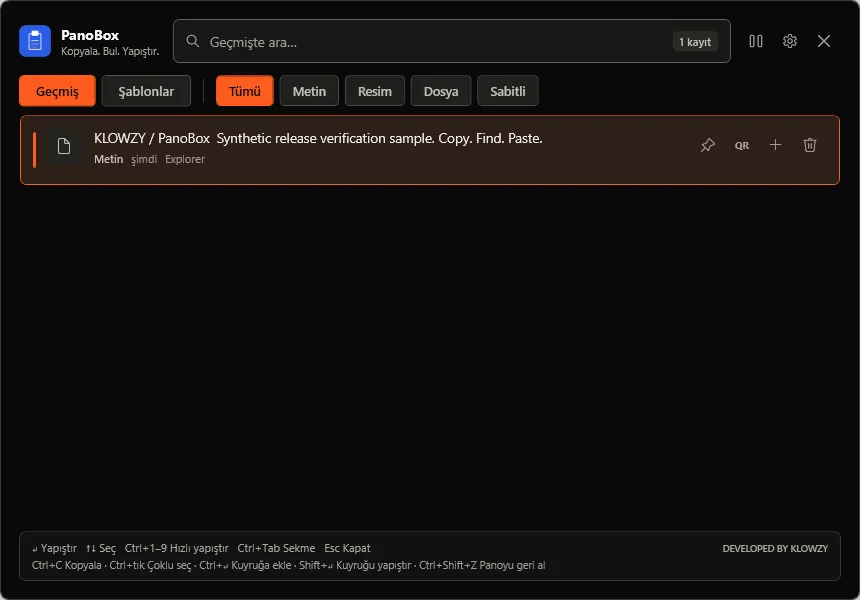
Open the palette with Ctrl+Shift+V, find a previous item, and paste it or copy it back to the clipboard. History includes text, image copies and file paths.
Fast, forgiving search
Search several words, exact phrases or exclusions, with Turkish character normalization, relevance ranking and filters for content type, source application, pinned items and dates.
Keep useful text nearby
Pin frequently used entries and create, edit and preview reusable templates with date, time and clipboard variables.
Paste as plain text
Press Ctrl+Shift+Alt+V in any app to paste the current clipboard without formatting, or paste file entries as a list of paths.
OCR on your PC
Extract text from a stored image using the Windows OCR engine and an installed Turkish or English language package, without uploading the image.
Local QR generation
Turn a text entry into a QR-code image and copy it to the clipboard. Generation runs locally; QR-code scanning is not included.
Your working preferences
Choose System, Dark or Light appearance, adjust text size and list density, pause capture from the tray or palette, and choose how long unpinned history is kept.
Privacy controls and backups
Exclude specific applications from capture, choose how long history is kept, and back up history, images, templates and preferences in one file, optionally encrypted with a password.
03How it works
- 01Start PanoBox and copy the text, image or file path you want to keep.
- 02Press Ctrl+Shift+V, type to search, and use the arrow keys to select an entry.
- 03Press Enter to paste, or use Copy when the target application does not accept simulated pasting.
04Screens
Light palette in English — search and reuse copied text. The screenshot uses demonstration content. Dark settings — language, appearance, shortcuts and Windows integration. Light settings in English — the same controls in the light theme.
05Specifications
| Version | 2.0.0 |
|---|---|
| Interface | English and Turkish |
| Distribution | Per-user Windows installer or portable x64 ZIP; self-contained .NET runtime |
| Storage | Local SQLite history and image files; optional AES-256 password protection for backups |
| OCR | Windows built-in engine, Turkish or English language package |
| Updates | Manual GitHub release check; opens the release page without installing updates |
| Code signing | Installer and executable are unsigned; SHA-256 checksums accompany official release packages |
| Requirements |
|
| Licence | Free for personal and internal business use Proprietary software. Redistribution of the complete, unmodified official package is permitted with its notices. Copyright © 2026 KLOWZY. All rights reserved. |
06Safety, privacy & security
Privacy
Clipboard history can contain private information
- History, templates, settings and generated images stay in local files. They are not encrypted by PanoBox; only backups can be protected with a password.
- Password-manager and token filters reduce accidental capture but cannot identify every secret. Pause capture before copying sensitive information.
- Applications you add to the exclusion list are never recorded. New installations keep unpinned history for 30 days by default.
- A manual update check contacts GitHub and exposes ordinary request metadata, such as your public IP address, without sending clipboard content.
07Known limitations
- The installer and executable are not code-signed, so Windows SmartScreen may warn before the first run. Compare the SHA-256 checksum with the official release.
- Text capture is limited to 100,000 characters per entry.
- Clipboard images are stored as PNG copies within size limits; images over 16,777,216 total pixels, 7680 pixels on either side or 16 MiB encoded are skipped.
- File history records file paths; it does not archive the contents of the referenced files.
- Automatic pasting may not work in games, elevated windows or applications that reject simulated keyboard input. Copy the entry and paste it yourself instead.
- OCR needs a compatible installed Windows language package, and recognition quality depends on the stored image.
- Backups without a password and text exports are not encrypted. A forgotten backup password cannot be recovered.
- Backups created by PanoBox 1.7.0 or earlier (JSON) do not contain image files; they can still be restored without images.
08Downloads
2.0.0Release notes
Installer.exe
Installs the application on this PC.
PanoBox-2.0.0-win-x64-Setup.exe
Download50.1 MBPortable.zip
Runs without installation.
PanoBox-2.0.0-win-x64.zip
Download69.8 MB
Verify the download
Compare the SHA-256 hash of the downloaded file with the checksum published in the same release. In PowerShell:
Get-FileHash .\PanoBox-2.0.0-win-x64-Setup.exe -Algorithm SHA256ChecksumsSHA256SUMS.txt
09Release history
English interface, a per-user Windows installer, optional password-protected backups, plain-text paste, better search and editable templates.
Portable ZIP backups with images, per-app capture exclusions, history expiry presets and safer Explorer copy actions.
Safer clipboard capture and imports, reliable paste and templates, original-size image history, and refreshed KLOWZY dark/light themes.