ODCStorageB.01
OZFA Disk Control
Disk diagnostics, history and management for Windows technicians.
Releases and documentation only — source is not published.
01Overview
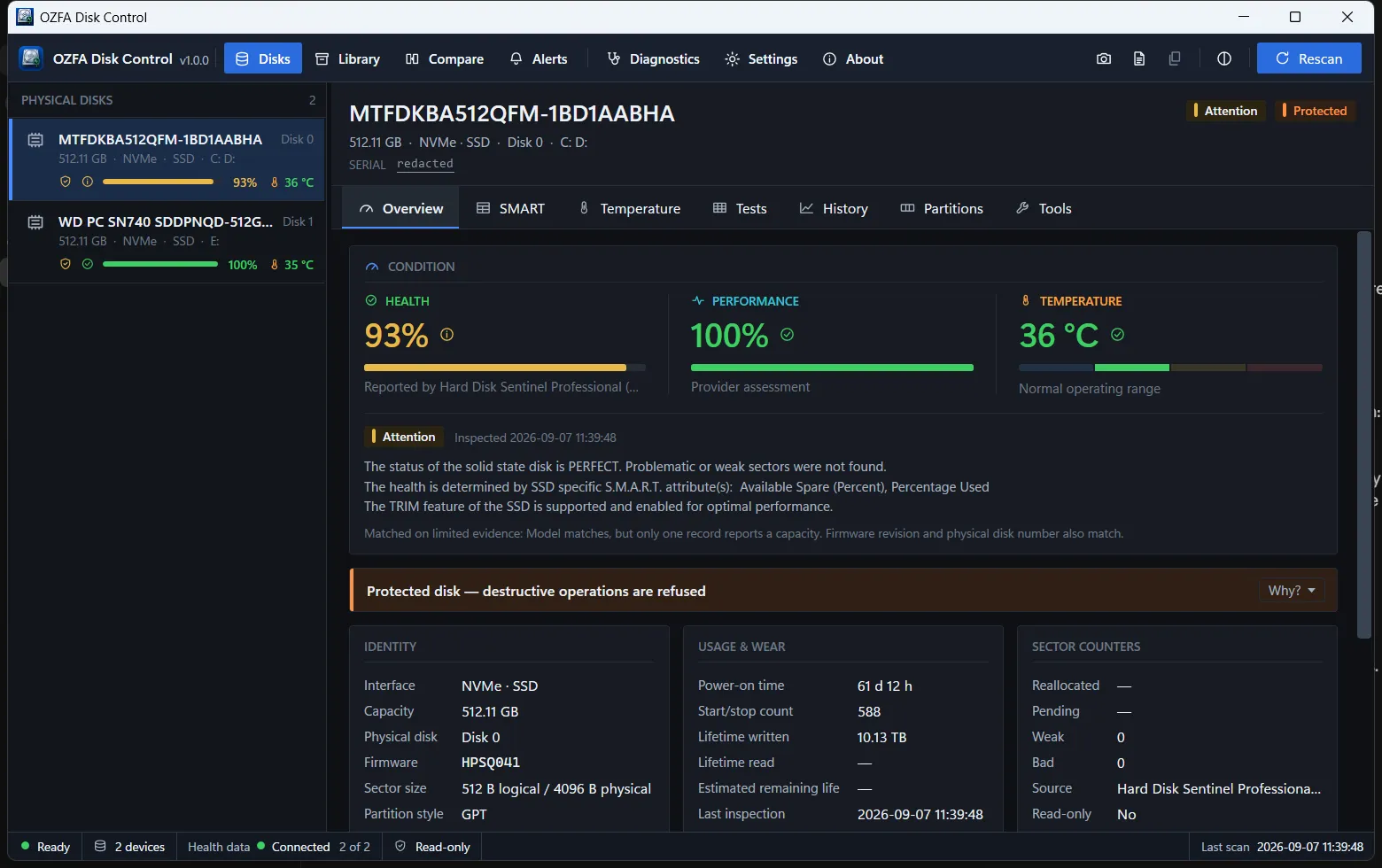
OZFA Disk Control is a desktop workstation for people who work with disks: HDDs, SSDs, NVMe drives, USB storage, and disks being prepared for CCTV and NVR duty. It identifies every device properly rather than by drive letter, reads its condition, remembers what it has seen over time, tests it without writing to it, prepares it when you ask — and refuses to touch anything it cannot positively identify.
It is dense on purpose. Health, temperature, protection status and capacity are visible for every attached device at once, and the pages behind them are one press away.
Everything that does not need Hard Disk Sentinel works without it: discovery, identity, partitions and volumes, capacity, read tests, surface scans, benchmarks, reports, history and the disk tools. When a health reading is unavailable, it is reported as unavailable rather than guessed.
02Capabilities
Identifies every physical disk
Model, serial, firmware, bus, capacity and sector sizes — an identity that stays stable across ports, renumbering and reconnection. Never a drive letter.
Reads condition
Health, temperature, performance, power-on time, lifetime writes, sector counters and the full SMART attribute table.
Remembers
Event-driven history per device, a searchable library of every disk the installation has seen, and a “what changed” comparison between any two inspections.
Tests without writing
Quick check, read/verify, a full surface scan with a response-time block map, and a sequential read benchmark with temperature measured either side.
Works a whole bench at once
Run read-only checks across several devices in one pass, scheduled so drives sharing an adapter do not measure each other, with a Pass / Warning / Fail verdict and a printable summary.
Prepares disks, deliberately
Initialize, GPT/MBR, partitions, letters, labels and quick format — each operation planned, checked against the safety rules, shown in full and confirmed before it runs.
Firmware erase
ATA Secure Erase, NVMe Sanitize and NVMe Format — offered only where the drive reports support, one disk at a time, and checked afterwards with a printable record of what was and was not verified.
Reports and alerts
Technician reports as PDF, JSON or CSV; threshold alerts with duplicate suppression and Windows notifications; monitoring continues from the notification area.
03Screens
S.M.A.R.T. — the full attribute table with raw values, thresholds and what each one means. History — what a disk has done over time, and what changed between two inspections. Tests — read-only quick check, surface scan with a live block map, and a sequential benchmark. Disk tools — planned, checked and confirmed before anything is written.
04Specifications
| Version | 1.7.0 |
|---|---|
| Editions | Setup (installer) and Portable (ZIP) — same build, different data location |
| Runtime | Self-contained .NET — nothing to install first |
| Local storage | SQLite database, under the user profile or beside the portable executable |
| Health provider | Hard Disk Sentinel Professional over WMI (separate product, not bundled) |
| Report formats | PDF, JSON, CSV |
| Code signing | Not signed — verify the SHA-256 checksum before running |
| Requirements |
|
| Licence | Proprietary Licensed for personal use and for the internal business use of your organisation, including commercial repair work. Redistribution and resale are not permitted. Source code is not published. |
05Safety, privacy & security
Safety
Safety rules enforced in code
- The Windows system and boot disk is never a destructive target.
- Anything the running Windows depends on is protected, wherever it lives. No confirmation unlocks it.
- A drive letter alone never selects a target — identity is resolved to a physical device.
- Every destructive plan is shown in full and confirmed explicitly before anything is written.
- The target is re-checked immediately before execution and again before every step that writes.
- An ambiguous identity fails closed, never open.
Caution
Not yet verified on hardware
- The planner, safety checks, confirmation flow and dry run are complete and covered by tests. A real format, repartition or firmware erase has so far only been executed against a test backend. The application says so at the point a real run is chosen. Use a disk you can afford to lose.
Privacy
Privacy
- No telemetry, no analytics, no crash reporting.
- The update check (on by default, can be turned off) sends the running version number and nothing else. It cannot download or install anything.
- The optional shared library connects only to a server address you type in yourself. Off by default.
06Downloads
v1.7.0Sep 23, 2026Release notes
| File | Type | Size |
|---|---|---|
| OZFA-Disk-Control-v1.7.0-Setup.exe | Application | 89.2 MB |
| OZFA-Disk-Control-v1.7.0-Portable.zip | Application | 120.9 MB |
| SHA256SUMS.txt | Checksum | 205 B |
Verify before you run
Releases are not code-signed. Compare the SHA-256 hash of your download with the checksum file published beside it.
Get-FileHash .\OZFA-Disk-Control-v1.7.0-Setup.exe -Algorithm SHA25607Release history
Advanced disk operations — firmware erase (ATA Secure Erase, NVMe Sanitize, NVMe Format), verified afterwards, and per-drive capability reporting.
Release notesDisk management — Quick Format Disk from a right-click, with every check behind it left exactly where it was.
Release notesTechnician workflow — Bench Mode for read-only checks across several disks at once, with job tickets and printable summaries.
Release notesBuilt from shop feedback — closes a hot-swap bug and reworks the workflow around the disks a technician is handling.
Release notesTwo problems found using 1.2 on the bench, one of them serious.
Release notesThree problems found while using 1.1 on the bench. Nothing else changed.
Release notesHealth data for disks behind USB adapters and docks, matched on limited evidence that can never authorize a destructive operation.
Release notesFirst public release — installer and portable editions, both self-contained.
Release notes